Resources
Supplying artwork
This guide has been designed to assist you in creating PDF files to our specifications, thus ensuring that your print project flows smoothly through our Studio, reducing potential delays in your printing schedule. If you have any queries relating to this document or any other questions regarding pre-press, please do not hesitate to contact us.
InDesign PDF preset
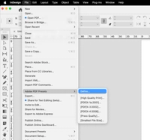
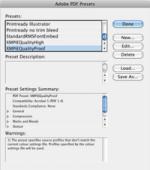
To help you achieve these requirements, we have supplied the following PDF Preset for InDesign which will allow you to choose‘Banbury Litho InDesign’ when exporting to PDF.
Other considerations
When your job includes one of the special inks or finishes below, please follow these instructions:
White ink
If your project includes white ink printed on our Lino digital press, all the elements that print white, need to be coloured as a spot colour named ‘White’. Please do not simulate the colour of the stock in the artwork.
Clear ink
If your project includes clear ink printed on our Lino digital press, all the elements that print clear need to be coloured as a spot colour named ‘Clear’. Please do not simulate the colour of the stock in the artwork.
Kiss cut
If your project includes kiss cutting on our Mutoh Valuecut, all shapes that are to be kiss cut need to be coloured as a spot colour named ‘CutContour’.
Sheet folding guide
The following guide explains the different folding options available to you.

Paper size guide
We can accommodate all of the following paper sizes. Use this handy paper size guide when choosing the size of your next project.
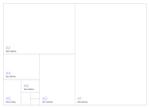
A Series Paper Dimensions (mm)
| 4A0 | 1682 x 2378 |
| 2A0 | 1189 x 1682 |
| A0 | 841 x 1189 |
| A1 | 594 x 841 |
Envelope size guide
The following guide explains the different envelope options available to you.
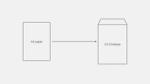
C4 envelope size
| C4 | 1682 x 2378 |
| A4 | 1189 x 1682 |
C5 envelope size
| C5 | — 297 x 420 |
| A5 | — 210 x 297 |
C6 envelope size
| C6 | — 26 x 37 |
| A6 | — 26 x 37 |
DL envelope size
| DL | — 26 x 37 |
| A4 (folded) | — 26 x 37 |